
Add real-time lighting to Unity 2D sprites using the Sprites/Diffuse shader (Built-in) or Sprite-Lit-Default (URP). This tutorial covers material setup, light configuration, and ambient light settings.
How do I add lighting to 2D sprites in Unity?
In Unity there are multiple ways to create a "Sprite Diffuse Shader" (meaning that sprites are affected by light sources), using both Shader Graph (URP) or HLSL. If you're new to shader programming, my intro to writing shaders in Unity covers the basics.
By default, 2D sprites in Unity ignore lights entirely: they always render at full brightness regardless of your scene lighting. A diffuse shader changes that, letting point lights, directional lights and spotlights actually affect your sprites. This is especially useful for games with dynamic lighting, top-down RPGs, or any 2D scene where you want that extra bit of depth. Unity offers at least 2 ways to achieve this, depending on which render pipeline you're using.
Using Shader Graph
URP/SRP
With the addition of the URP (Universal Render Pipeline), or SRP (Scriptable Render Pipeline) you can use the "2D" rendering asset, which already includes a Sprite Diffuse Shader. If you're on URP, this is the easiest path: no custom shader needed, just assign the built-in 2D lit material to your sprite renderer and you're done.
LWRP/HDRP
If you're using older versions of Unity, with LWRP or HDRP installed, here's how you can create a Sprite Diffuse Shader. In this tutorial I've used: Lightweight Render Pipeline 2.0.5-preview, Unity 2018.2.0f2.
Here's what we'll achieve:
Diffuse Shader
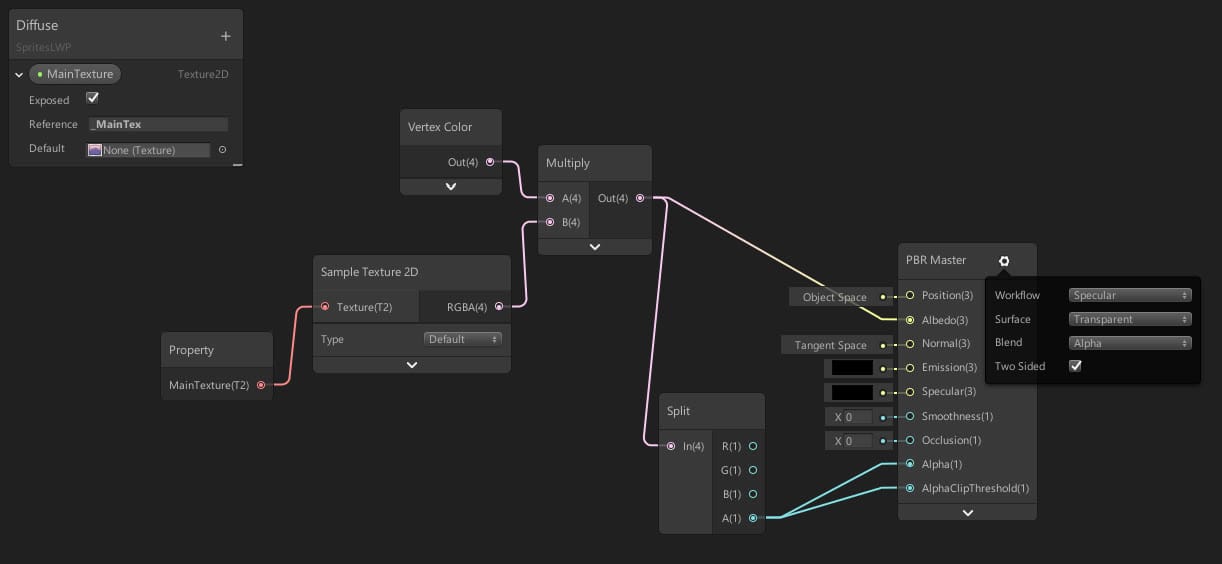
Here's the shader:
Explanation
In a few words: Sprite Renders need the sprites texture to be called "_MainText".
The Shader Graph setup uses just a handful of nodes. The key thing to remember is that SpriteRenderers expect the main texture to be named _MainTex (note the exact name, not _MainTexture which Shader Graph uses by default). If you get a shader that works in the graph preview but shows solid pink/white sprites in play mode, this is almost always the cause. You can rename the property directly in the Blackboard, or use the [MainTexture] attribute. Once you've got sprite lighting working, you can layer on more effects like a sprite outline shader or a procedural fire shader on top.
Writing it in HLSL
If you want to write a sprite diffuse shader in HLSL, you can go to the Unity Archive and install the built-in shaders for each Unity version. Unity ships with around 50+ built-in shaders, and the Sprites/Diffuse shader is one of them. Downloading the built-in shaders for your specific version (for example Unity 2018.2) gives you the full HLSL source to study and modify.
The HLSL approach gives you more control than Shader Graph, but it requires knowing the lighting model Unity expects. For 2D sprites, you'll be working with the Lambert lighting model or the 2D sprite light system, depending on your pipeline. The built-in Sprites/Diffuse shader is a good starting point since it's already handling the _MainTex naming and the alpha blending correctly.
Steps to create a sprite diffuse shader in Shader Graph (LWRP)
- Install LWRP or URP in your project via the Package Manager.
- Create a new Shader Graph asset (right-click in Project window, Create > Shader > PBR Graph or Lit Graph depending on your version).
- In the Blackboard, add a Texture2D property. Rename it to
_MainTex(this is required for SpriteRenderers to pick it up). - Add a Sample Texture 2D node, connect your
_MainTexproperty to its Texture input. - Connect the RGBA output to the Base Color (and Alpha if you need transparency).
- Save the shader, create a new Material using it, and assign it to your SpriteRenderer.
Frequently asked questions
Does Unity have a built-in sprite diffuse shader?
Yes. In URP, the 2D rendering asset includes a Sprite-Lit-Default shader that handles diffuse lighting out of the box. For older pipelines, you can download the built-in shaders from the Unity Archive.
Why does my Shader Graph sprite look solid white or pink in play mode?
The texture property in your graph is probably not named _MainTex. SpriteRenderers look for that exact property name. Rename it in the Blackboard and it should work.
Should I use Shader Graph or HLSL for a sprite diffuse shader?
Shader Graph is faster to set up and easier to iterate on, especially if you're not comfortable with HLSL. Use HLSL only if you need fine-grained control over the lighting math or want to support pipelines that don't have Shader Graph.
Do I need to do anything special for URP 2D?
With the 2D Renderer (URP), you get sprite lighting for free using the Sprite-Lit-Default material. Just make sure your Camera uses the 2D Renderer asset, not the Forward Renderer.

Federico is the founder and original "Febucci", developing games since 2016 and helping others do the same. Started as a solo developer and built a team around Text Animator making tools, games and traveling to events with talks and more.

Sincere posts about game development
We have been making games for more than 10 years and we want to share with you everything we have learned along this journey, from game engine tutorials to the way we see things in general, including heartfelt rants and exciting wins. If you find what we do valuable, please consider joining the newsletter!
- Exclusive insights sent via email only
- Read extra content when logged in
- Join a friendly and sincere community
- Help us stay independent from algorithms


Comments