Unity Sprite Outline Shader: 2D Edge Effect [Shader Graph + HLSL]

![Unity Sprite Outline Shader: 2D Edge Effect [Shader Graph + HLSL]](https://storage.ghost.io/c/38/36/383676a1-e894-4116-9a98-bb5a9336da39/content/images/size/w1200/format/jpg/2024/09/sprites-outline-shader-thumbnail.jpg)
Create a 2D sprite outline shader in Unity by sampling the alpha channel of neighboring pixels. If any neighbor differs from the current pixel, you draw the outline color there. This tutorial covers both inner and outer variants in HLSL, with Amplify Shader Editor graphs included. If you're new to Unity shaders, start with our HLSL beginner guide first.
How do I add an outline to sprites in Unity?
In this "Unity Sprite Outline" tutorial we'll discover how to create both a "Sprite Innerline" and a "Outer Sprite Outline". The shader works by sampling the 4 neighboring pixels (left, right, up, bottom) around each texel - 1 texel distance, controlled via _MainTex_TexelSize. The Inner Sprite Outline is drawn "inside" the sprite, while "Outer" is the opposite. Both variants share the same 4-sample logic and differ by just 1 line of code.
Read more about "Texture's Texel Size" here.
HLSL
Both variants follow the same steps:
- Sample the original pixel color (
col) and its alpha. - Sample the 4 neighboring pixels (left, right, up, bottom) using
_MainTex_TexelSize. - Calculate the outline value from those 4 samples.
- Return the blended color using
lerp(col, _OutlineColor, outline).
Inner Sprite Outline HLSL
Shader "Unlit/InnerSpriteOutline HLSL"
{
    Properties
    {
        _MainTex ("Texture", 2D) = "white" {}
		_OutlineColor("Outline Color", Color) = (1,1,1,1)
    }
    SubShader
    {
		Tags
		{
			"RenderType" = "Transparent"
		}

		Blend SrcAlpha OneMinusSrcAlpha

        Pass
        {
            CGPROGRAM
            #pragma vertex vert
            #pragma fragment frag

            #include "UnityCG.cginc"

            struct appdata
            {
                float4 vertex : POSITION;
                float2 uv : TEXCOORD0;
            };

            struct v2f
            {
                float2 uv : TEXCOORD0;
                float4 vertex : SV_POSITION;
            };

            sampler2D _MainTex;
            float4 _MainTex_ST;
            float4 _MainTex_TexelSize;

			fixed4 _OutlineColor;

            v2f vert (appdata v)
            {
                v2f o;
                o.vertex = UnityObjectToClipPos(v.vertex);
                o.uv = TRANSFORM_TEX(v.uv, _MainTex);
                return o;
            }

            fixed4 frag (v2f i) : SV_Target
            {
                fixed4 col = tex2D(_MainTex, i.uv);

				fixed leftPixel = tex2D(_MainTex, i.uv + float2(-_MainTex_TexelSize.x, 0)).a;
				fixed upPixel = tex2D(_MainTex, i.uv + float2(0, _MainTex_TexelSize.y)).a;
				fixed rightPixel = tex2D(_MainTex, i.uv + float2(_MainTex_TexelSize.x, 0)).a;
				fixed bottomPixel = tex2D(_MainTex, i.uv + float2(0, -_MainTex_TexelSize.y)).a;

				fixed outline = (1 - leftPixel * upPixel * rightPixel * bottomPixel) * col.a;

                return lerp(col, _OutlineColor, outline);
            }
            ENDCG
        }
    }
}
Outer Sprite Outline HLSL
To achieve an "Outline" instead of an "Innerline", just change the "outline" line (in the previous code snippet) into this:
fixed outline = max(max(leftPixel, upPixel), max(rightPixel, bottomPixel)) - col.a;
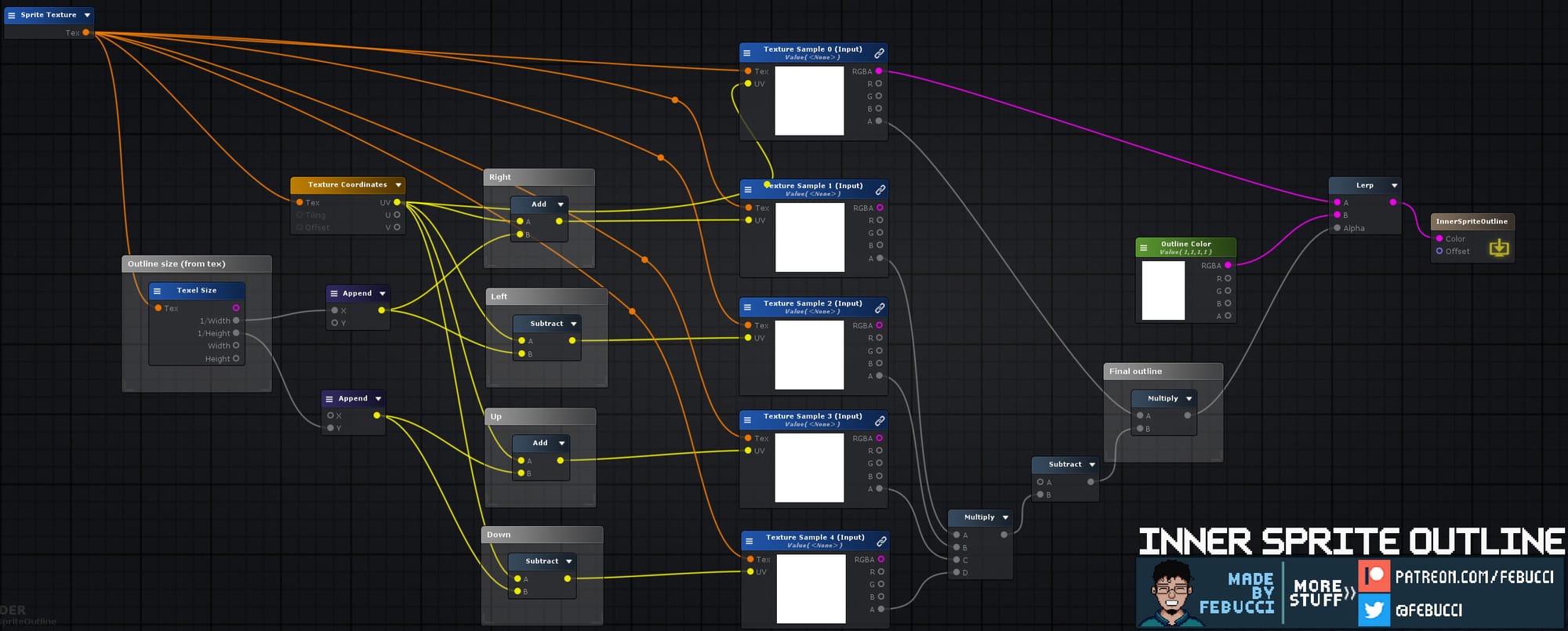
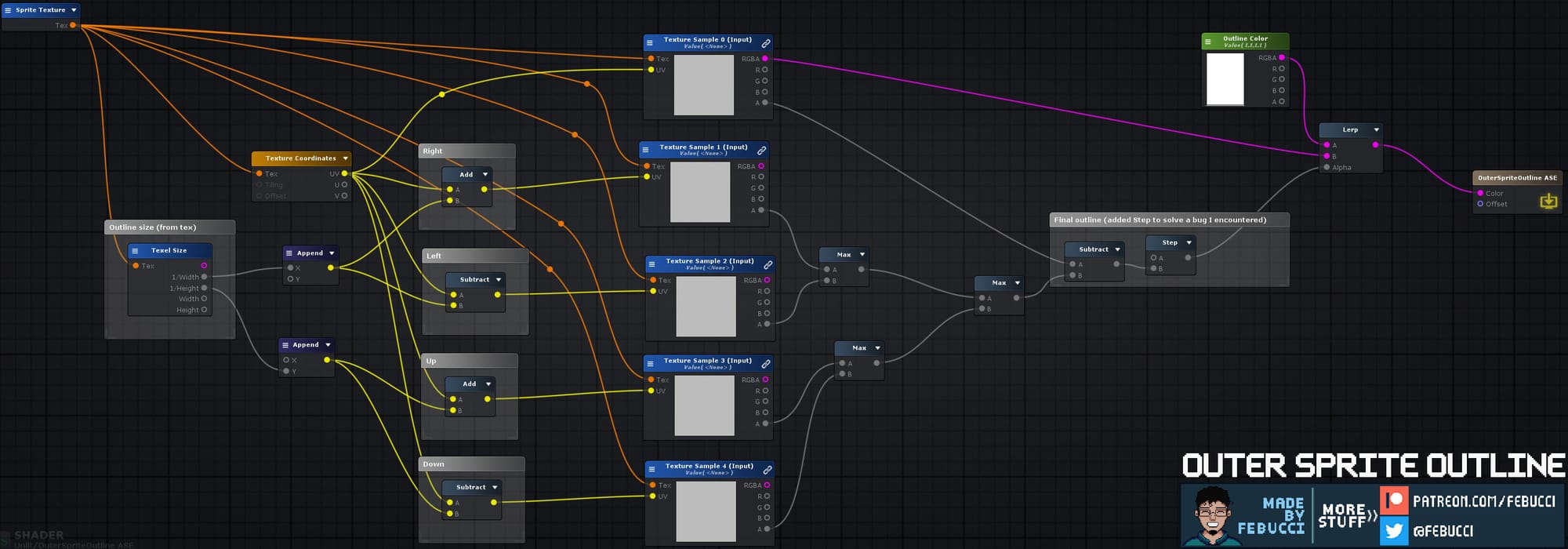
Amplify Shader
Inner Sprite Outline ASE
Outer Sprite Outline ASE
If you're working with 2D sprites, you might also find our sprite diffuse shader useful for custom lighting. For a different kind of visual effect, check out the pickable objects shader that highlights interactive items at runtime.
Frequently asked questions
What is the difference between inner and outer sprite outline?
The inner outline is drawn inside the sprite boundary (replacing border pixels), while the outer outline appears outside it by sampling pixels that are transparent but near the sprite edge.
Does this shader work with Unity's sprite atlas?
Yes, as long as you make sure the sprite has enough padding in the atlas so that neighboring sprites don't bleed into the outline samples.
Can I control the outline thickness?
This shader uses a fixed 1-texel width. To increase thickness you'd need to sample more neighbors or scale _MainTex_TexelSize by a multiplier property.
Does this work in the Universal Render Pipeline (URP)?
The HLSL variant targets the built-in pipeline. For URP you would need to convert the shader to an HLSL pass inside a URP ShaderLab structure or use Shader Graph instead.

Federico is the founder and original "Febucci", developing games since 2016 and helping others do the same. Started as a solo developer and built a team around Text Animator making tools, games and traveling to events with talks and more.

Sincere posts about game development
We have been making games for more than 10 years and we want to share with you everything we have learned along this journey, from game engine tutorials to the way we see things in general, including heartfelt rants and exciting wins. If you find what we do valuable, please consider joining the newsletter!
- Exclusive insights sent via email only
- Read extra content when logged in
- Join a friendly and sincere community
- Help us stay independent from algorithms
More Posts





Comments