
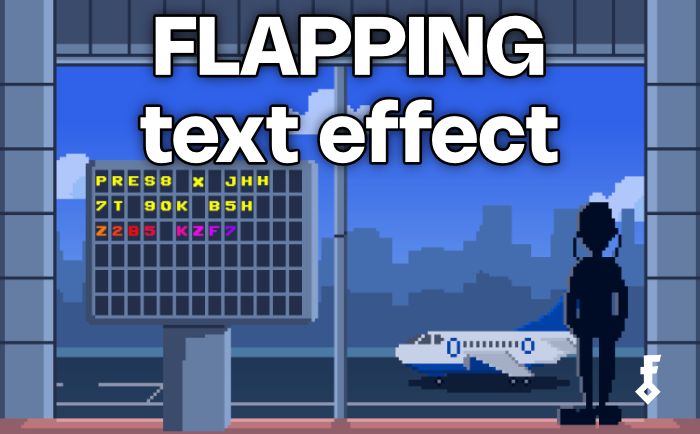
I have always been fascinated by the aesthetic of mechanical airport departure boards, where letters start flipping when text is changing.
Well... today we will recreate the feel of them using Unity with Text Animator 3!
Airport board flip text effect scene
Creating the effect
First we need to create a TMPText label that we will use to render our characters. Then we can attach the TextAnimator Component to the game object (as always).

Lastly we need to create a custom script for our effect:
using System.Collections;
using System.Collections.Generic;
using System.Text;
using Febucci.TextAnimatorForUnity;
using UnityEngine;

namespace Febucci.Examples
{
    public class AirportDisplayEffect : MonoBehaviour
    {
        [SerializeField] TextAnimatorComponentBase textAnimator;

        [Header("Airport Display Settings")]
        [Tooltip("Time in seconds between each random character cycle")]
        [SerializeField] float cycleInterval = 0.03f;
        [Tooltip("Time in seconds before the next character settles to its final value")]
        [SerializeField] float settleInterval = 0.05f;
        [Tooltip("Pool of characters used for the random cycling effect")]
        [SerializeField] string charPool = "ABCDEFGHIJKLMNOPQRSTUVWXYZ0123456789";


        readonly StringBuilder sb = new();


        IEnumerator FlipCoroutine(string targetText)
        {
            // get the count of visible character skipping rich text tags
            int visibleCount = textAnimator.CharactersCount;
            int settledCount = 0;
            float settleTimer = 0f;

            while (settledCount < visibleCount)
            {
		        // rebuild text considering Rich Text Tags
                string displayText = BuildDisplayText(targetText, settledCount);
                textAnimator.SetText(displayText);

                yield return new WaitForSeconds(cycleInterval);

                settleTimer += cycleInterval;
                if (settleTimer >= settleInterval)
                {
                    settleTimer = 0f;
                    settledCount = Mathf.Min(settledCount + 1, visibleCount);
                }
            }

            // Final text with all characters settled
            textAnimator.SetText(targetText);
            activeCoroutine = null;
        }

        /// <summary>
        /// Builds the display string for the current frame of the flip effect.
        /// The first <paramref name="settledCount"/> visible characters are kept as-is,
        /// while all remaining visible characters are replaced with a random character
        /// from <see cref="charPool"/>. Ritch Text Tags and whitespace are passed through unchanged.
        /// </summary>
        string BuildDisplayText(string text, int settledCount)
        {
            sb.Clear();
            int visibleIndex = 0;
            bool inTag = false;

            for (int i = 0; i < text.Length; i++)
            {
                char c = text[i];

				// if char is inside a Rich Text Tag, always appeand it without flipping letters
				// this will prevent effects from breaking
                if (c == '<' && !inTag)
                {
                    inTag = true;
                    sb.Append(c);
                    continue;
                }

                if (c == '>' && inTag)
                {
                    inTag = false;
                    sb.Append(c);
                    continue;
                }

                if (inTag)
                {
                    sb.Append(c);
                    continue;
                }

                // Visible character
                if (visibleIndex < settledCount || char.IsWhiteSpace(c))
                    sb.Append(c);
                else
                    sb.Append(charPool[Random.Range(0, charPool.Length)]);

                if (!char.IsWhiteSpace(c))
                    visibleIndex++;
            }

            return sb.ToString();
        }
    }
}
As the FlipCoroutine reveal each characters, for a small amount of time it periodically swaps new characters with a random letter from the charPool.
Finally we can add a function for setting the text like:
// ...

Coroutine activeCoroutine;

public void SetText(string text)
{
		if (activeCoroutine != null)
    StopCoroutine(activeCoroutine);

    activeCoroutine = StartCoroutine(FlipCoroutine(text));
}

// ...
You can call this function wherever you want to start the animation and show a new text:
airportDisplay.SetText(...);
We’re done! Just wire up every component and start messing around with your new effect.
Thanks so much for reading and I hope you liked it; see you on the next one!
Cheers ✨

Daniel is a junior programmer at Febucci Team. Specialized in tech art with a Computer Engineering background. Also co-founded and managed the first student video game development team in Italy with Gabriele.

Sincere posts about game development
We have been making games for more than 10 years and we want to share with you everything we have learned along this journey, from game engine tutorials to the way we see things in general, including heartfelt rants and exciting wins. If you find what we do valuable, please consider joining the newsletter!
- Exclusive insights sent via email only
- Read extra content when logged in
- Join a friendly and sincere community
- Help us stay independent from algorithms
More Posts





Comments